For many people looking for a lawyer nearby, your Google Business Profile is the first thing they see: the firm's name, its rating, its hours and a button to call. Whether that profile appears, and what it says when it does, is partly in your control.
The honest answer to "how do I rank on Google Maps?" has two parts. A complete, accurate profile helps Google understand your firm and helps a prospective client choose it. But no checklist guarantees a position. Google says local results rest mainly on relevance, distance and prominence, and that there is no way to request or pay for a better local ranking.
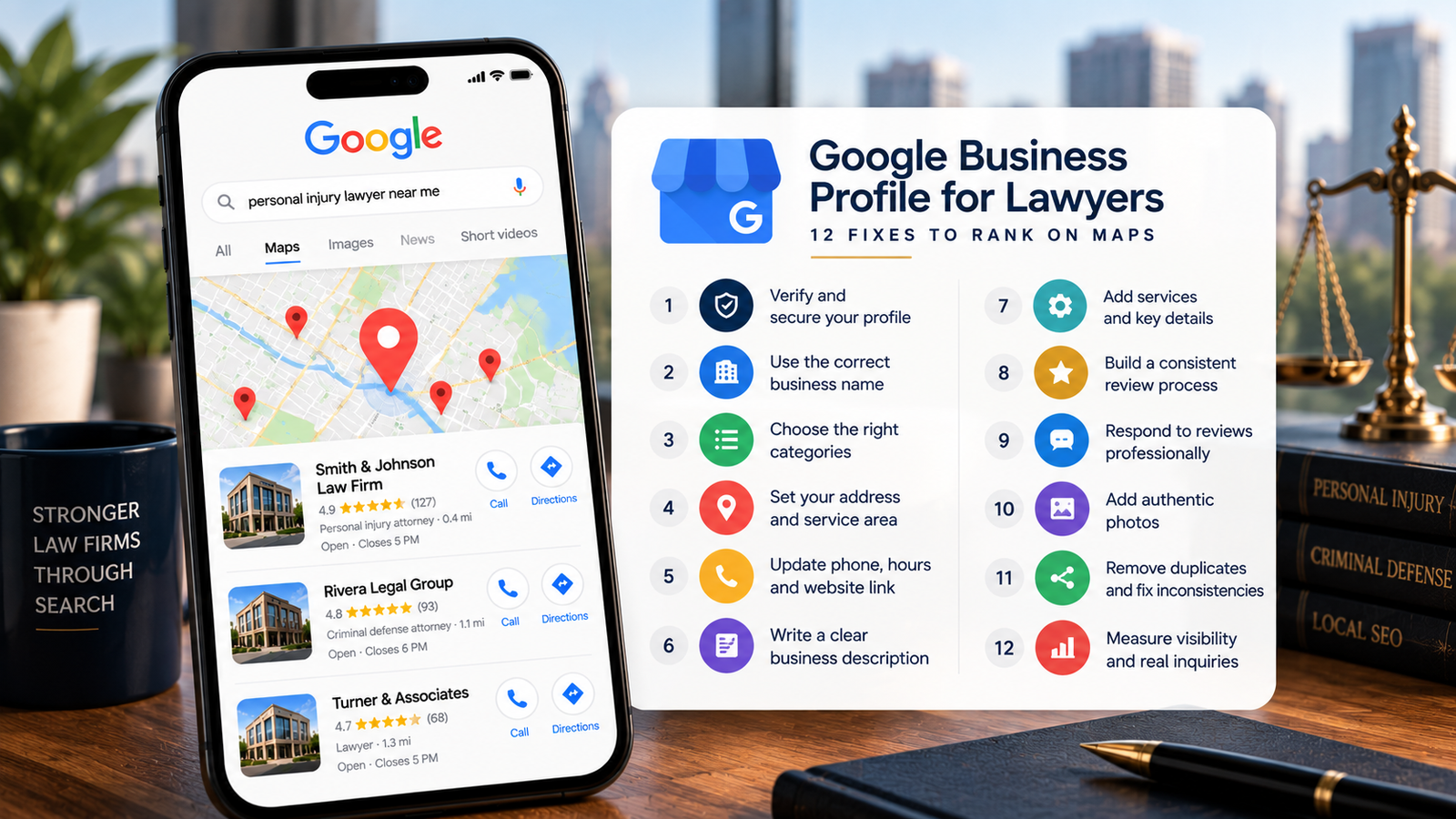
Below are 12 fixes in the order we would make them. The first four protect the profile. The next six make it useful to the people reading it. The last two show whether any of it produced new clients.
The short version
- Secure ownership first. The firm, not a vendor or a former employee, should be the primary owner of every profile.
- Accuracy comes before optimization. A keyword in the firm's name or an ineligible address can get a profile suspended.
- Reviews are asked for, never bought, filtered or scripted. Google bans incentives, asking only happy clients and requesting specific wording.
- A review reply should never confirm that the reviewer was a client.
- Measure calls and signed cases, not views. Google's "calls" figure counts taps on the call button, not conversations.
What Google looks at when ranking local law firms
Google names three main factors for local results. It does not publish how much each one weighs, so treat any precise formula you are shown with suspicion.
| Factor | What Google means | What your firm can influence |
|---|---|---|
| Relevance | How well a profile matches what someone searched for | Your category, services, description and the page your profile links to |
| Distance | How far the firm is from the person searching, or from the place they named | Nothing directly. You can only decide which areas each office can realistically win. |
| Prominence | How well known the firm is, based on signals such as links to the firm and its reviews | Your review process, consistent details across the web and local links and mentions |
Distance explains a pattern that surprises many partners: the same firm can appear first on the map at its own door and not at all a few miles away. That is why checking your ranking from your desk tells you almost nothing. For how map results fit alongside the regular results, see how search engines rank law firms.
The 12 Google Business Profile fixes for lawyers
Work through these in order. Each one notes why it matters, because a fix you understand is a fix you can defend to a partner.
Fix 1. Verify the profile and secure ownership
Google says verification tells it you are authorized to represent the business and makes the profile more likely to appear. Ownership decides who can change it, and who keeps it when a vendor leaves.
- Sign in to your Business Profile and confirm it shows as verified.
- Open the list of people with access. The firm should be the primary owner, through an account the firm controls rather than one person's private email.
- Give agencies and freelancers manager access, not ownership. They can do the work without holding the keys.
- Record every owner and manager, with the date you checked, alongside your other firm records.
- If a former agency or web developer holds ownership, have them transfer it before you change vendors.
Why it matters: Google's own guidance on working with third parties says outsiders cannot access your profile without your permission, and only owners control who has access. If a vendor says otherwise, treat it as a warning sign.
Fix 2. Use the firm's real-world business name
Google requires the name the firm actually uses on its signage, website and stationery. Adding anything else is not permitted and can lead to suspension.
- Put the profile name beside your sign, letterhead and website. They should match.
- Remove practice areas, cities, taglines and phone numbers. "Harper & Reyes Car Accident Lawyers Tampa" becomes "Harper & Reyes," unless the longer version truly is the firm's name everywhere.
- Check legal suffixes such as LLP or P.C. Google treats them as unnecessary unless real-world proof, such as signage or business cards, consistently shows them as part of the name.
- Individual attorney profiles may include a title such as Esq. or JD. Google allows this for practitioners.
Fix 3. Choose the most accurate primary category
Your category tells Google what the firm is, which feeds directly into relevance. Google's test is simple: the category should complete the sentence "This business is a..." rather than "This business has a..."
- Choose the most specific category that describes most of the firm's work. A firm that mainly handles injury claims would look at Personal injury attorney before a general Lawyer category.
- Add secondary categories only for work that is a real part of the practice. Google asks for as few categories as possible.
- Do not add categories for work you refer out. They attract searches the firm cannot serve.
- If you have several offices offering the same services, give them the same primary category. Google expects consistency across locations.
Why it matters: a category that is too broad leaves Google guessing. A category that describes work you don't do brings calls you have to turn away.
Fix 4. Correct the address and service-area settings
Google only accepts a real location. Address problems are a common reason profiles fail verification or get suspended.
- List an office where your staff work during the stated hours. Google does not accept a rented mailing address that the firm doesn't operate from, often called a virtual office.
- A shared or co-working office qualifies only if it has clear signage, receives clients during business hours and is staffed by your own people.
- Keep permanent signage with the firm's name at any address you show.
- Give a second office its own profile only if it meets the same test. A satellite office used "by appointment" deserves a careful check first.
- If the firm meets clients only at their locations, not at an office, Google's approach is a service area with the address hidden. A firm that never meets clients in person should check Google's eligibility rules before creating a profile at all.
Fix 5. Update the phone number, hours and website link
A profile that sends a caller to the wrong office, or lists hours when nobody is there, loses the person reading it.
- Phone. Use a number that reaches that office and that the firm controls. Google prefers a local number to a central call center line where possible.
- Call tracking. If you use a tracking number, keep the firm's main number listed as an additional number, make sure the tracking number transfers to the firm if you change vendors and test it monthly.
- Hours. List the hours the office is open to clients. Set holiday and closure hours before the day arrives, not after.
- Website link. Point each profile to the most relevant page, usually that office's page, not always the homepage. A tracking tag on the link, such as
?utm_source=google&utm_medium=organic&utm_campaign=gbp, lets your analytics separate profile visits from other search traffic. - Call the number and tap the link from a phone. That is how most prospective clients will use them.
Fix 6. Complete the business description and attributes
The description is where a prospective client reads, in plain words, what the firm does and for whom.
- Say who you help, with what kinds of matters and where. Mention the languages the firm works in.
- Follow Google's limits: no links, no prices or promotions and nothing unrelated to the firm.
- Leave out superlatives and anything you couldn't prove. Words such as "expert" or "specialist" can carry extra advertising rules for lawyers, and those rules vary by state, so check with your state bar before using them.
- Complete the attributes that are true for your office, such as accessibility details or online appointments. Which attributes appear depends on your category.
Why it matters: a description stuffed with keywords reads badly to a person and adds no proven ranking benefit. A clear one helps the reader decide to call.
Fix 7. Review the services and other profile details
- List the services the firm actually handles, in the words clients use: "DUI defense," "wrongful termination," "truck accident claims."
- Match each listed service to a page on your website, so the profile and the site tell Google the same story.
- Remove services the firm refers out.
- Check which other fields your profile offers, such as a booking link, and fill in the ones that apply.
Why it matters: services help describe the firm accurately. Adding a service does not by itself make the profile rank for it.
Fix 8. Build a consistent review-request process
Google counts reviews as part of prominence, and prospective clients read them closely. Google allows you to ask every client for an honest review, for example with a Google review link or a QR code. Its content policy prohibits the rest of the playbook some agencies still sell.
| Google prohibits | What it looks like at a law firm |
|---|---|
| Incentives | A fee reduction, gift card or favor in return for a review, or for changing or removing one |
| Selective asking | Sending requests only to clients whose matters went well, or discouraging negative reviews |
| Staff quotas | Asking each attorney or paralegal to bring in a set number of reviews |
| Requested content | Asking clients to mention a practice area, use certain words or name a particular attorney |
| Pressure on site | Asking a client to write a review before leaving the office |
| Conflicted reviews | Reviews from staff, former staff, family or anyone with a professional tie to the firm |
- Pick one point in every matter when the request goes out, such as the closing letter, and send it to every client.
- Use the same short, neutral message each time.
- Keep a simple record of requests sent, so a slow month is visible early.
- Before you start, have the firm check its state's professional-conduct rules on soliciting reviews. Those rules vary and change.
Fix 9. Respond to reviews without exposing client information
Review replies are public and long-lived. For a lawyer, they are also a confidentiality question.
- Never confirm that the reviewer was a client, and never mention a matter, outcome or detail, even in a thank-you.
- Even if the reviewer describes their own matter, don't add to it. Whether a reply may respond to those details is a question for your state bar or ethics counsel.
- Keep replies short. Move any dispute to a phone call.
- Don't argue, and don't use a reply to market the firm.
- Report reviews that break Google's policies rather than answering in kind. Sometimes the right reply is none.
| Situation | Instead of | Write |
|---|---|---|
| Positive review | "Thanks, Maria. We're so glad we got your custody case resolved quickly." | "Thank you for taking the time to share your feedback." |
| Negative review | "You missed two appointments, and your claim was weak from the start." | "We take every concern seriously. Please call our office manager at [number] so we can talk directly." |
Fix 10. Add authentic photos and keep the profile current
- Show the building exterior with your sign, the entrance and the reception area. These help a first-time client find the right door.
- Add photos of your attorneys and staff only with their consent.
- Skip stock photos presented as your office.
- Use posts for genuine updates, such as a new office or holiday hours. Google's local ranking tips mention photos and videos, not a posting schedule, so treat posting frequency as housekeeping, not strategy.
- Check the profile once a month for changes you didn't make. Anyone can suggest an edit, and Google can update details using other sources.
Fix 11. Check for duplicate profiles and inconsistent details
Duplicate and outdated listings split reviews and leave Google unsure which version of the firm to show.
- Search Google Maps for the firm's name, each past address and each attorney's name.
- Mark profiles for old offices as moved or closed through the proper process, rather than leaving them live.
- Decide what happens to the profile of an attorney who has left the firm.
- Make the firm's name, address and phone number match on your website, the main legal directories, Apple Maps and Bing.
- Never create extra profiles for keywords, practice areas or cities.
A rule specific to lawyers: attorney profiles
Google treats lawyers as individual practitioners, who can have their own profiles under specific conditions:
- The attorney must be public-facing and reachable at the verified office during its stated hours. Support staff should not have profiles.
- Where several attorneys practice from one office, the firm keeps its own profile, and each attorney profile uses only the attorney's name.
- Where one attorney is the only public-facing lawyer at a branded office, Google recommends a single shared profile named "Firm Name: Attorney Name."
- One profile per attorney, not one per specialty.
Fix 12. Measure map visibility and real inquiries
This fix decides whether the other 11 were worth doing. Without a baseline, every later number is a guess.
- Record a baseline before you change anything: the date, your priority searches and the profile's current performance figures.
- Check visibility from many points across your service area, not one. A grid-based scan shows where you appear and where you don't.
- Add a source field to intake, so every inquiry records how the person found you.
- Where your records allow, follow inquiries through to consultations and signed cases or new matters.
- Keep a change log: what changed, on what date and what else changed at the same time, such as ad spend, a new office or the season.
| Measure | Where it comes from | What it tells you | What it doesn't |
|---|---|---|---|
| Calls | Profile performance report | How often people tapped the call button | Whether the call connected, or was answered |
| Website clicks and directions | Profile performance report | Other ways people acted on the profile | Whether they became clients |
| Views | Profile performance report | Unique people who saw the profile, counted once a day | Anything about intent or outcome |
| Map visibility | A grid scan of your priority searches | Where each office appears across its area | How many people searched |
| Qualified inquiries and new clients | Your intake records | What the profile is worth to the firm | Nothing, if the source field is left blank |
How this plays out in different practice areas
The 12 fixes apply to every firm, but the pressure points differ.
Personal injury. Markets are often crowded, with many firms close together and review counts that run high. Relevance and a steady review process carry more weight when distance can't separate you from the firm down the street. This is also where keyword-stuffed names are most common, which is why Fix 2 matters. Our approach to SEO for personal injury law firms starts there.
Criminal defense. Searches are often urgent and can come at any hour, so an accurate phone number and honest hours (Fix 5) are not details. Many clients also value privacy and may not want to post a public review, so reviews typically arrive more slowly. Ask every client the same way, never push and take extra care with replies (Fix 9). See how we approach SEO for criminal defense law firms.
Business-facing firms. For an employment or corporate firm, many new matters start with a lawyer's name or a referral rather than a map search. The profile still matters, because in-house counsel often check it before a first call. Accuracy, attorney profiles (Fix 11) and a clear description do most of the work.
Which fixes should a law firm make first?
Follow the three phases. This is a practical order of work, not a claim about how Google weighs each item.
| Phase | Fixes | Why it comes here |
|---|---|---|
| 1. Correct and protect | Ownership, name, category, address | Errors here can cost you the profile itself. Nothing else is safe until they are right. |
| 2. Make it useful | Contact details, description, services, reviews, replies, photos | These shape what a prospective client sees and whether they call. |
| 3. Measure and maintain | Duplicates and consistency, measurement | These keep the work from coming undone and show whether it produced new clients. |
One caution on sequence: make changes to the name, address and category one at a time, and record each one. Large edits to those fields can prompt Google to review the profile or ask you to verify it again, and a single documented change is far easier to explain than several at once.
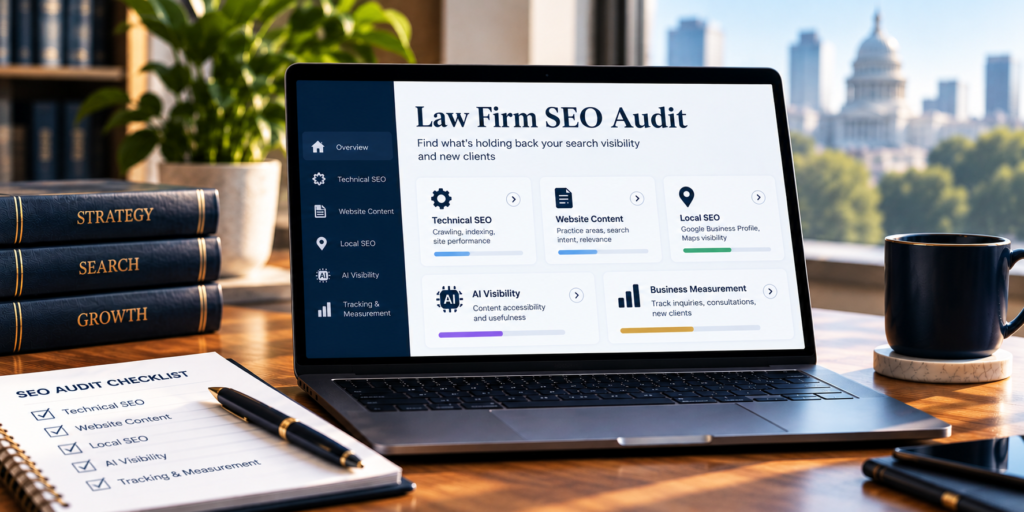
If your profile is only one part of the question, a broader law firm SEO audit covers the website, intake and tracking alongside it.
How long does it take to see a difference?
It depends on the change. Corrections to contact details and hours usually show quickly. Verification and review processes run on Google's timetable. Reviews and local links build over months. And distance never changes at all.
Competition matters as much as the fixes. A firm in a small town with a few rivals can move faster than one surrounded by dozens of firms in the same category.
Be wary of anyone who names a fixed number of days. Instead, record your baseline, make documented changes and compare like periods: this quarter against the same quarter last year, not October against a holiday month. Expect profile activity, such as calls and website clicks, to move before signed cases do.
When should a law firm get help with local SEO?
A profile is one part of local search, not a substitute for the rest. Consider outside help if:
- The profile is verified and complete, but the firm still doesn't appear for its priority searches across its area.
- You have several offices with uneven visibility or inconsistent details.
- A profile has been suspended, or Google won't verify an office.
- You can't tell which inquiries, consultations or new clients came from the profile.
- Your website pages need to support each office as well.
That is the work our local SEO for law firms covers, office by office, with reporting measured in calls and signed cases.
Make the profile accurate, useful and measurable
Get the foundation right before anything else: ownership, name, category and address. Then make the profile answer the questions a prospective client has, follow Google's rules on reviews and protect client confidentiality in every reply. Finally, measure what people do after they find you, all the way to signed cases. A profile built that way gives your firm a fair chance on the map, without risking the listing you already have.
See where your firm appears on the map today
Our free audit shows where each office appears across its area for your priority searches, which firms are ahead of it and what to fix first.
Confidential. No obligation. Includes a 30-minute strategy consultation.Frequently asked questions
Can we add our city or practice area to the firm's name on Google?
Only if that is genuinely the firm's name, used consistently on its signage, website and stationery. Otherwise Google treats it as an addition to the name, which it does not permit and which can lead to suspension.
Should every attorney at the firm have a Google Business Profile?
Google allows it for attorneys who are public-facing and reachable at the office during its stated hours. Where several attorneys share an office, the firm keeps its own profile. Whether attorney profiles help depends on the firm, so decide deliberately rather than letting them appear by accident.
How many Google reviews does a law firm need?
Google publishes no target. A more useful comparison is the firms that already appear for your priority searches. A steady flow matters more than a burst, and Google's policy specifically flags unusual volumes or patterns of reviews as a sign of manipulation.
Can we appear on the map in a city where we have no office?
Rarely. Distance is one of Google's three main factors, and Google does not accept virtual offices. For a city without an office, a useful location page on your website can compete in the regular results below the map.
Sources
- Google Business Profile Help: Tips to improve your local ranking on Google
- Google Business Profile Help: Guidelines for representing your business on Google
- Google Business Profile Help: Tips to get more reviews
- Maps User Generated Content Policy: Prohibited and restricted content
- Google Business Profile Help: Understand your Business Profile performance and insights
- Google Business Profile Help: Tips for working with third parties to manage your Business Profile
All Google sources checked October 26, 2026. Google updates its policies and interface often, so confirm current wording before acting on any single rule.
This article is general information about search marketing, not legal advice. Attorney advertising and professional-conduct rules vary by state and change over time. Consult your state bar or ethics counsel about your firm's obligations.